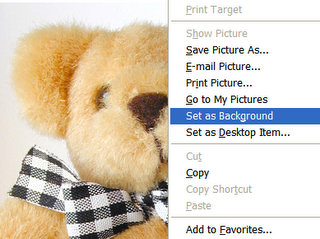
Did you know that you can use images from the web as your desktop
background? If you're using Internet Explorer, and you find a picture
that you want to use as your desktop background. All you have to do is
right-click on the picture, and then select 'Set as Background' in the
menu.
If you minimize all the windows, you should now see the image that you selected as your desktop background. For the best results, use the largest image that you can find that comes close to matching the resolution of your monitor.
If you minimize all the windows, you should now see the image that you selected as your desktop background. For the best results, use the largest image that you can find that comes close to matching the resolution of your monitor.

No comments:
Post a Comment